
Barcodes for Shopify & Shopify POS
Shopify SKU generator
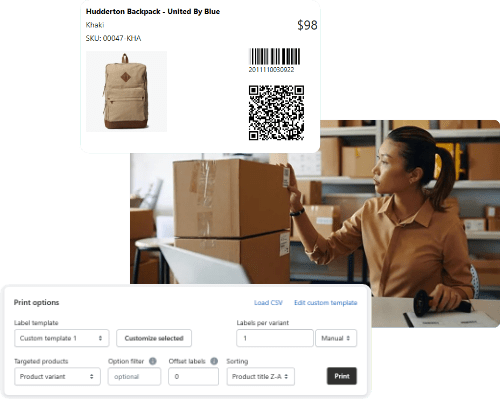
Generate SKU numbers, barcodes and product labels for Shopify and Shopify POS.
- Generate barcodes with different formats (GTINs, EANs, UPCs and more) plus SKUs.
- Design label templates with drag-and-drop clicks, including QR codes when needed.
- Print labels on any paper size in bulk, using any printer your team already has.
- Add any product details you need, like name, SKU, price, options and tags to labels.
- Print labels directly from Stocky purchase orders and the Shopify product page.
SKU Generator for Shopify
SKU Format Rules, Examples, and Bulk Setup
Why SKUs get messy fast and why Shopify stores suffer
If you have more than a handful of products, SKUs stop being “nice to have” and start becoming the backbone of inventory accuracy. In Shopify, SKUs help with inventory tracking, reporting, fulfillment, and integrations, and Shopify expects SKUs to be unique per variant for clean operations.
The problem is that most stores grow in layers:
- a spreadsheet here
- a supplier code there
- one person inventing SKUs
- then another person copying them.
You end up with duplicates, inconsistent abbreviations, and SKUs that do not reliably tell your team what the item is.
This guide fixes that with a simple SKU format you can keep for years, plus the fastest way to apply it across your Shopify catalog.
What a SKU is and what it is not
A SKU (stock keeping unit) is your internal product identifier. It is usually an alphanumeric code that helps your team find, pick, pack, reorder, and report on items.
A barcode is different. Barcodes are typically used for scanning at checkout and logistics. Shopify supports adding barcodes to products and variants (manually, via CSV import, or via an app like Retail Barcode Labels).
Practical rule:
- Use SKUs for internal organization and reporting.
- Use barcodes when you need scanning workflows (Shopify POS, warehouse scanning, label printing).
SKU format rules that actually work in Shopify
Shopify’s own SKU guidance is simple and useful, and it matches what tends to work across inventory systems:
- keep SKUs short
- avoid confusing characters
- avoid special characters and spaces
- stay consistent
- stay unique
- and plan for growth.
We suggest keeping SKUs to about 16 characters or less when possible.
A few rules that prevent SKU breakage in the real-world:
- Avoid confusing characters (0 vs O, 1 vs I).
- Avoid spaces and special characters, they can create search and import issues.
- Do not start with 0 if you rely on spreadsheets, because some spreadsheet workflows drop leading zeros.
- Make every segment mean something, and document your abbreviations so your team does not invent new ones midstream.
SKU format examples you can copy (and adapt)
A good SKU is readable, consistent, and structured.
Here are some handy example formats for your Shopify store (numeric with separators, or alphanumeric that encodes attributes).
Example format template
CATEGORY-BRAND-STYLE-COLOR-SIZE
Example: TSH-ACM-014-BLK-M
Apparel examples
- Tee shirt:
TSH-ACM-014-BLK-M - Hoodie:
HDY-ACM-210-GRY-L
Jewelry examples
- Ring:
RNG-GLD-021-EMR-7(category, material, style, stone, size) - Necklace:
NCK-SLV-110-PRL-18(category, material, style, stone, length)
Home goods examples
- Mug:
MUG-CRMC-040-WHT-12OZ - Candle:
CND-SOY-090-VAN-08OZ
If you do one thing, do this: pick a format that fits your catalog, then lock it in. The format matters more than the exact abbreviations.
How to add and bulk-edit SKUs in Shopify (manual method)
You can add SKUs while creating a product, or by editing existing products and variants. Shopify also supports bulk editing SKUs using the bulk editor or importing via CSV.
A practical workflow for a growing catalog:
- Define your format and abbreviations (a one-page “SKU legend”).
- Bulk update existing products via Shopify bulk editor or CSV import.
- Add a rule for new products so future SKUs match the system.
Shopify will warn you about duplicate SKUs, and duplicates can cause problems with integrations and tracking.
When spreadsheets and free generators stop being enough
Free tools like SKUGen can help you generate a simple list of up to 100 SKUs and print labels for one product at a time.
You’ll need more robust SKU creation if you need to do the following,:
- Apply the same format to products and variants in bulk
- Generate SKUs only where missing, without overwriting existing codes
- Catch and resolve duplicate SKUs and barcodes
- Generate barcodes in specific formats and print labels for retail workflows
That is the point where a paid Shopify-native SKU generator is faster, cleaner, and less error-prone than exporting and re-importing spreadsheets repeatedly.
Recommended solution: generate SKUs, barcodes, and labels in Shopify with SKUGen
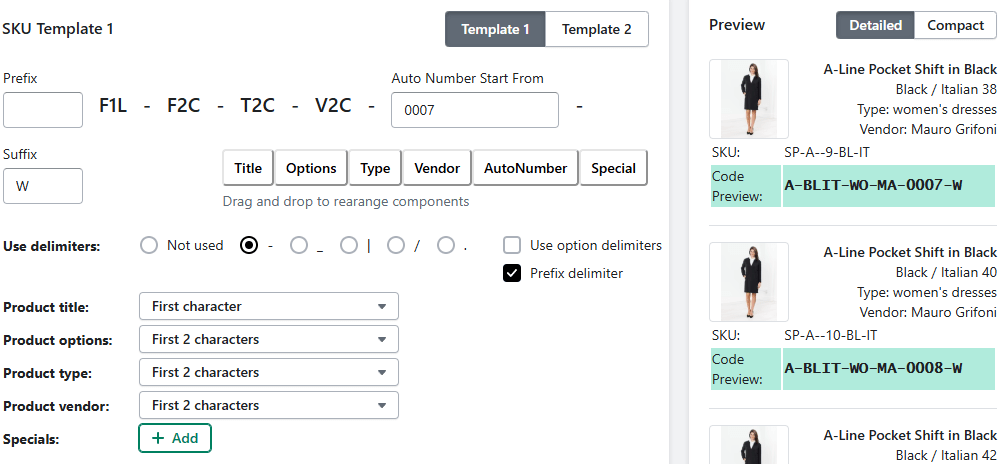
SKUGen is built specifically for Shopify merchants who need SKU generation, barcode formats, and label printing that stays synced with Shopify and Shopify POS.
It supports bulk SKU and barcode generation, custom rules, a duplicate checker, label templates (including QR codes), and printing from filtered product lists, collections, and Stocky purchase orders (from csv).
It also supports common barcode formats (GTIN, UPC, EAN, Code 128) and label printing from Shopify products, variants, and CSV files (including Stocky exports).
Next step: install SKUGen and set your template once.
How to use SKUGen (simple 3-step workflow)
Step 1: Build a SKU template once
SKUGen lets you build a repeatable SKU pattern using product fields like prefix, title, options, vendor, plus auto numbers, and custom codes for sizes or colors.
Step 2: Generate in bulk, without breaking existing SKUs
You can run generation across a whole catalog or target a subset (collections, tags, filtered product lists). You can also run it only on missing SKUs when cleaning up a catalog.
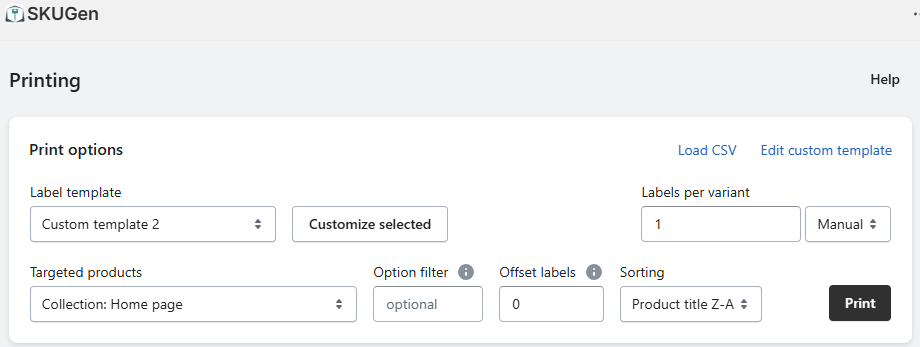
Step 3: Print labels that match Shopify (and retail workflows)
SKUGen supports label printing that stays aligned with Shopify product data, including barcode and QR formats, and workflows tied to Stocky purchase orders.
FAQs
What is a good SKU format in Shopify?
Use a consistent, meaningful format that your whole team can decode. Shopify recommends keeping SKUs short (often 16 characters or less), avoiding special characters/spaces, and planning for growth.
Do SKUs need to be unique in Shopify?
For clean tracking and reporting, yes, Shopify advises SKUs should be unique per product variant, and duplicates can cause issues with integrations and inventory tracking.
What characters should I avoid in SKUs?
Avoid special characters and spaces, and avoid formats where 0 and 1 can be confused with O and I. Dashes and underscores can be useful separators.
Should I start a SKU with 0?
If you rely on spreadsheet workflows, avoid starting with 0, because leading zeros can be dropped in spreadsheet processing.
What is the difference between SKU and barcode?
A SKU is an internal identifier for your store’s inventory workflow, a barcode is commonly used for scanning at checkout and logistics. Shopify supports adding barcodes to products and variants by app, manual edit, or CSV.
How do I bulk add SKUs in Shopify?
Shopify supports bulk editing SKUs via the bulk editor or by importing via CSV.
Can SKUGen generate SKUs only for products missing SKUs?
Yes, SKUGen supports generating only missing SKUs so existing codes are not overwritten.
Can SKUGen generate barcodes too?
Yes, SKUGen supports barcode generation in formats like GTIN, UPC, EAN, and Code 128, and it supports printing labels with barcodes and QR codes depending on plan and settings.
Can I print barcode labels for Shopify POS?
Shopify supports barcode label printing via supported label printers and software, including using the Retail Barcode Labels app, plus other label software options depending on setup.
What plan do I need to start with SKUGen?
SKUGen is free to install with a free tier, and paid plans add automation, custom codes, and label printing at scale.
SKU Generator Recommendations
Best-fit recommendations
- SKUGen (Shopify app)
Best for: Shopify merchants who need bulk SKU creation, barcode formats, duplicate checks, and label printing tied to Shopify workflows (including Stocky). - Shopify Retail Barcode Labels (Shopify app)
Best for: merchants who primarily need simple barcode label printing workflows with Shopify-supported hardware and label software setup guidance. - Free SKU generators (Zoho, Gorgias)
Best for: early-stage stores creating an initial SKU list, but they do not solve Shopify-native bulk application, label printing, or ongoing enforcement by themselves.
Side-by-side comparison
Option | Best for | Strengths | Limits |
SKUGen | Shopify catalogs that are growing | Bulk generation, duplicate checks, barcode formats, label templates, Stocky workflows | Advanced needs depend on plan/add-ons |
Retail Barcode Labels | Basic barcode labels for POS | Shopify-supported setup paths for printing labels | More limited SKU system control |
Zoho, Gorgias | Drafting SKUs before implementation | Helpful rules and examples, quick lists. | Not Shopify-native enforcement, no direct workflow integration |
Ready to clean up your SKUs?
Install SKUGen, set up one template and generate SKUs and barcodes in bulk without spreadsheet re imports.