
Barcodes for Shopify & Shopify POS
Shopify SKU generator
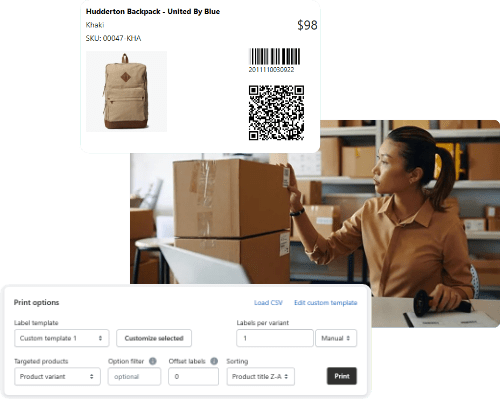
Generate SKU numbers, barcodes and product labels for Shopify and Shopify POS.
- Generate barcodes with different formats (GTINs, EANs, UPCs and more) plus SKUs.
- Design label templates with drag-and-drop clicks, including QR codes when needed.
- Print labels on any paper size in bulk, using any printer your team already has.
- Add any product details you need, like name, SKU, price, options and tags to labels.
- Print labels directly from Stocky purchase orders and the Shopify product page.
Set Up a SKU Format That Works for Variants
A Shopify SKU generator is useful only if your SKU format can handle the realities of running a store.
Real store life includes new colors, renamed option values, late-night bulk edits, and someone on your team typing “Navy Blue” three different ways.
This post explains a variant-first SKU format that stays predictable and shows how to apply it in bulk with SKUGen using custom SKU logic, so your catalog stays organized.
How to Set Up a SKU Format That Works for Variants in Shopify
To set up a SKU format that works for variants in Shopify, follow these three steps:
- Use a stable base code for the product.
- Add text or number short options a fixed order.
- Apply the rule in bulk, then fix any duplicate SKUs before they cause problems for your operations team.
Shopify explicitly warns that duplicate SKUs can cause issues with third-party integrations and inventory tracking.
Shopify Fulfillment Network also requires each variant to have a unique SKU for outbound transfers.
What Shopify cares about (and why you should too)
Shopify uses SKUs as an internal identifier you can attach to variants.
If two different variants share the same SKU, Shopify will show a duplicate SKU warning, and Shopify notes that this can create integration and inventory-tracking issues.
If you use Shopify Fulfillment Network, you cannot use the same SKU on different variants. That does not mean Shopify will always block you from saving duplicates.
This means Shopify is warning you about the risk, and some workflows require each SKU to be unique.
A SKU format that works for variants
A variant-safe SKU has two parts:
- A base code that identifies the product model.
- A variant code that identifies the option combination.
Use this structure:
BASE.OPT1.OPT2
Keep OPT order consistent across the store.
Changing the order changes what the SKU means.
Real examples (easy to scan in a pick list)
T-shirt with Color + Size
TEE104.BLK.MTEE104.BLK.LTEE104.NVY.M
Serum with Size only
SER210.30MLSER210.50ML
Vase with Finish + Color
VAS055.MAT.WHTVAS055.GLS.WHT
This format is easy to read because the base code is short.
It also stays consistent because the order of options never changes.
The part that prevents “SKU drift”
If your generator uses raw option text, and someone renames an option value, the output changes.
That’s a straightforward cause and effect and this is why you need a list.
A list matches messy labels to stable codes.
List example
Color
- Black = BLK
- White = WHT
- Navy Blue = NVY
- Midnight Navy = NVY
Size
- Extra Small = XS
- Small = S
- Medium = M
- Large = L
- One Size = OS
If “Navy Blue” and “Midnight Navy” are different colors, assign them different variables.
If they are actually the same color, use the same variable for both.
How to bulk update SKUs in Shopify (without an app)
Shopify lets you edit SKUs in bulk using the bulk editor, or by importing a CSV.
When importing a CSV, make sure the variant rows stay aligned correctly.
If you change the wrong rows, you might assign the wrong SKU to a variant.
How to do this with a Shopify SKU generator (SKUGen walkthrough)
SKUGen is a Shopify app that generates SKUs from product data, supports bulk actions, and includes duplicate detection.
The easiest way to keep things organized is to roll out changes in small, controlled batches.
Step 1: Pick a small batch
Pick a collection, a tag, or “missing SKUs only.”
A small batch is easier to review after you make changes.
Step 2: Decide what BASE will be
BASE needs to stay stable even if your product title changes.
BASE can be a short model code you already use or a sequence you create.
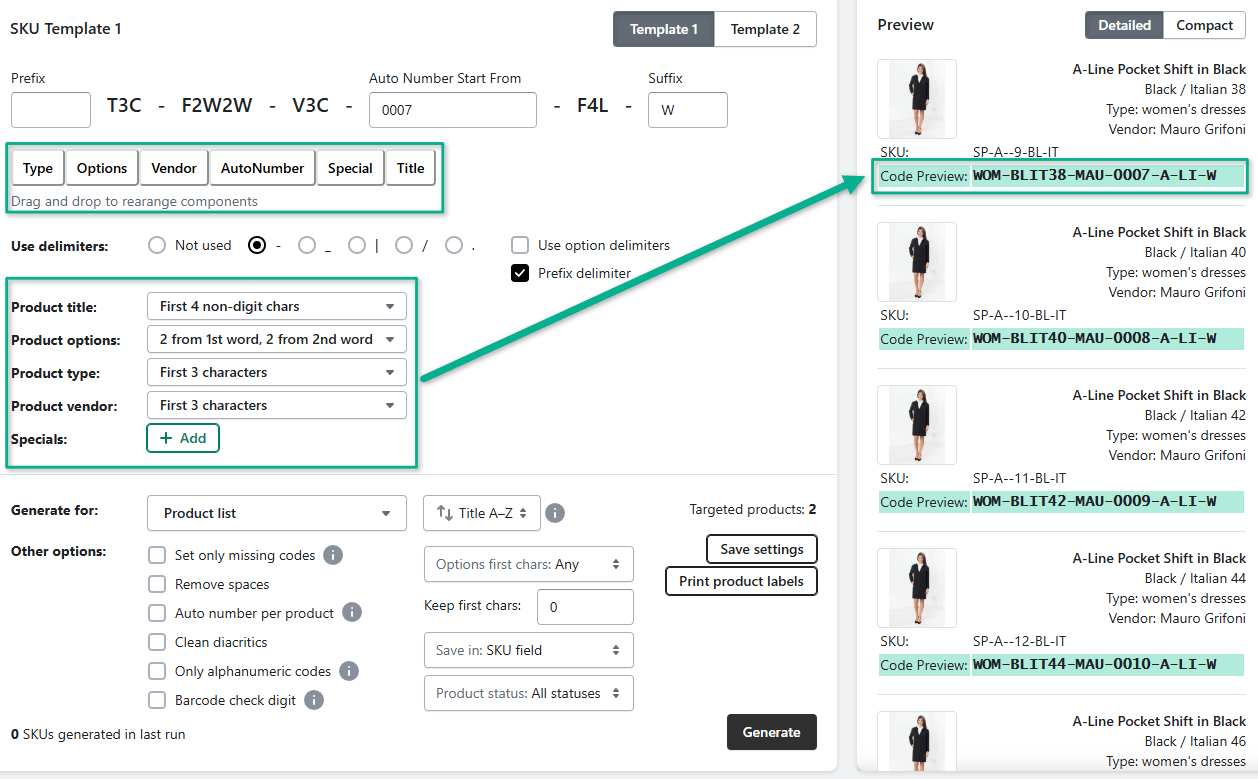
Step 3: Map option values to using custom SKU rules
SKUGen supports custom SKU rules and templates.
This step ensures “Midnight Navy” always becomes NVY.
Step 4: Lock the option order in the template
Pick Color then Size, or Size then Pack, and keep it consistent.
A fixed order helps people scan SKUs quickly and predictably.
Step 5: Run duplicate detection before you apply
SKUGen has duplicate detection for SKUs and barcodes.
Shopify also warns that duplicate SKUs can cause tracking and integration issues.
Step 6: Apply, then spot-check inside Shopify
Open a few products you just updated.
Check that each variant has its own unique SKU.
If you use Shopify Fulfillment Network, this step is not optional.
SFN requires unique SKUs per variant for outbound transfers.
For more information on how to set up SKUs for Shopify, check out our blog on SKU Format Rules, Examples, and Bulk Setup.
FAQ
Do SKUs need to be unique per variant in Shopify?
Shopify warns that duplicate SKUs can cause issues with third-party integrations and inventory tracking.
If you use Shopify Fulfillment Network, each variant must have a unique SKU for outbound transfers.
How long can a Shopify SKU be?
Shopify accepts SKUs up to 16 characters.
What is the safest way to roll out a new SKU format?
- Start with a small batch.
- Preview the output.
- Check for duplicates.
- Apply, then spot-check in Shopify.
Can I bulk edit SKUs without a SKU generator app?
Yes. Shopify supports bulk edits and CSV imports for variant editing and SKU updates.