
Integration options
DPD Germany Options
This page contains the country-specific options exactly as documented on the main DPD page.
DPD Germany Options
We are a DPD Certified Silver Partner. The name of the certified company is WebShopAssist and the certified shipping system is DPD Integration for Shopify. Please mention this to DPD when you are requesting webservice access.
DPD Germany has two web services options: The Core web-service and the Cloud web-service. The web-services have different kind of credentials and what kind of access you'll get, depends on your contract which DPD.
The Core Web Service
For this service, the app requires a username and a password to connect, which can be provided by DPD, if you have access to this web-service.
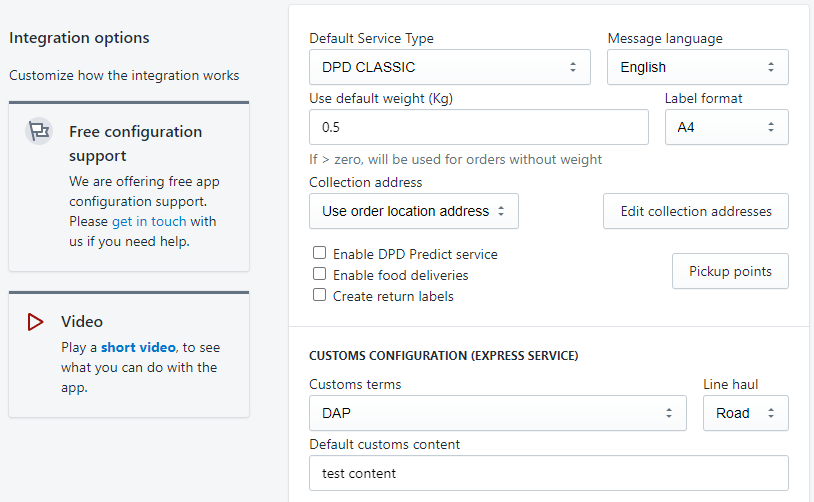
- Default Service Type - It's the service type that will be used to create shipments in DPD system.
- Message language - the language used for error messages returned by DPD and for notifications, if enabled
- Use default weight - DPD requires the order weight to create a shipment. If the products in an order do not have the weight set, the order's total weight will be zero and the shipment creation will fail. For such orders, if this value is greater than zero, it will be used to create the shipment.
- Label format - The paper size and format for the PDF file with the shipment label, which can be accessed from the app.
- Collection address - you can choose tu Use order location address or one custom address which can be added using the Edit collection addresses button.
- Enable DPD Predict service - if enabled, DPD will send email notifications to customers regarding the delivery.
- Enable food deliveries - if enabled, the parcels will be marked to deliver as product 'DPD Food'.
- Create return labels - if enabled, for each parcel a return label will be also created. This works for EU destinations only.
- Pickup Points button - configuration for Delivery to Pickup Points.
- Customs terms - you can select how the customs duties and taxes are paid
- Line haul - select if the delivery is made by Air or by Road
- Default customs content - the default package description for customs. It can be edited in the Fulfillment details page, when you create a label for one order. It is used as defined here when batch mode is used.
- Customs configuration (Express service)
These options are used only for DPD Express service, if the destination country is not in the EU.
The Cloud Web Service
For this service, the app requires an user ID and a token to connect, which can be provided by DPD, if you have access to this web-service.
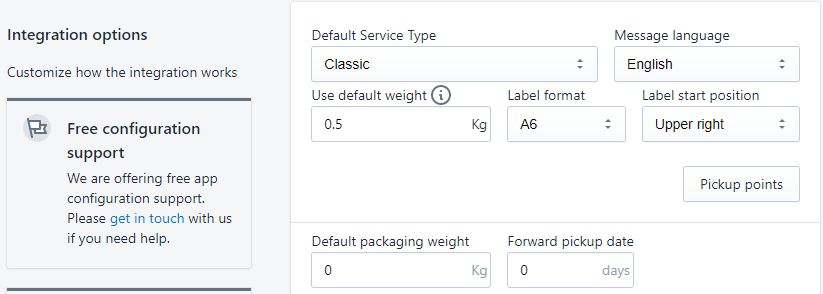
- Default Service Type - It's the service type that will be used to create shipments in DPD system.
- Message language - the language used for error messages returned by DPD and for notifications, if enabled
- Use default weight - DPD requires the order weight to create a shipment. If the products in an order do not have the weight set, the order's total weight will be zero and the shipment creation will fail. For such orders, if this value is greater than zero, it will be used to create the shipment.
- Label format - The paper size and format for the PDF file with the shipment label, which can be accessed from the app. A4 or A6
- Label start position - Select label printing positions: UpperLeft, UpperRight, LowerLeft or LowerRight
- Pickup Points button - configuration for Delivery to Pickup Points.
Back to the DPD app overview
Return to the main page for features, pricing, FAQ and country links.