
Shopify app
DPD Integration by WebShopAssist
Install DPD Integration on Shopify
Options depend on the DPD API available in your country
Integration options
DPD Slovakia Options
This page contains the country-specific options exactly as documented on the main DPD page.

DPD Slovakia Options
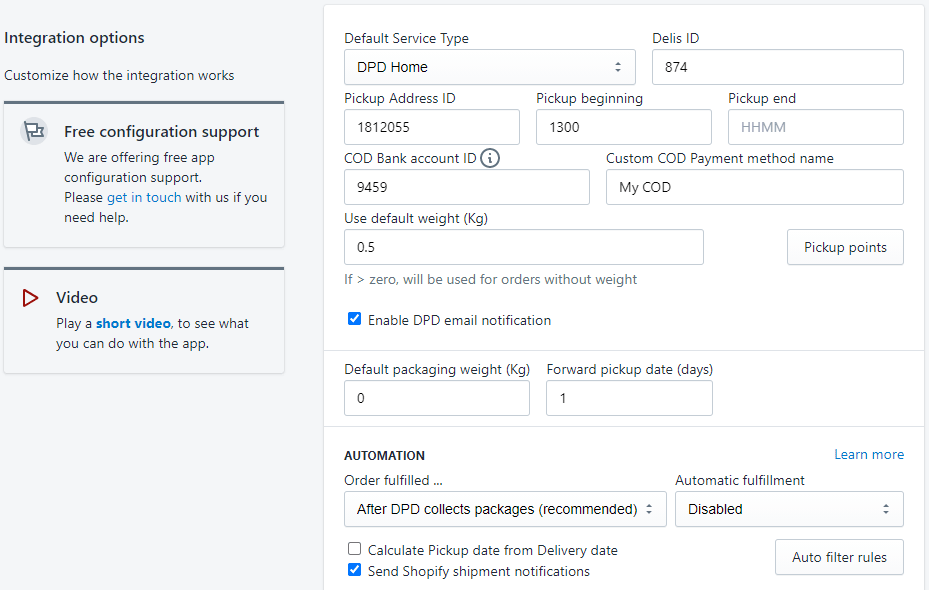
- Default Service Type - It's the service type you have contracted with DPD. It can be found in your contract.
- Delis ID - taken from the DPD customer portal - Settings / Pickup addresses
- Pickup Address ID - taken from the DPD customer portal - Settings / Pickup addresses
- Pickup beginning & Pickup end - the time interval for pickup in HHMM format (hours & minutes). For example, 14:00 must be entered as 1400.
- COD Bank account ID - Add COD bank account in DPD customer portal (Settings / Bank accounts) and copy the ID here.
- Custom COD Payment method name - the name of the custom payment method defined in Shopify Payment settings for COD. Cash on delivery shipments require a bank account configured in your DPD customer portal settings.
- Use default weight - DPD requires the order weight to create a shipment. If the products in an order do not have the weight set, the order's total weight will be zero and the shipment creation will fail. For such orders, if this value is greater than zero, it will be used to create the shipment.
- Enable DPD email notification - if enabled, DPD will send email notifications to customers regarding the delivery.
- Order fulfilled ... - select when the app should mark your order as fulfilled.
- Automatic fulfillment - Each time a new order is created by a customer, the system automatically creates a fulfillment request for the items using this fulfillment service and generates a tracking number
- Send Shopify shipment notifications - If enabled, notification emails are sent to customers when delivery reaches various states: package on the way, package out for delivery, package delivered. The templates for these notifications can be modified in Settings / Notifications / Shipping.
- Auto rules - Please see Automatic filtering rules
Back to the DPD app overview
Return to the main page for features, pricing, FAQ and country links.