
Integration options
DPD UK & DPD Local UK Options
This page contains the country-specific options exactly as documented on the main DPD page.
DPD UK & DPD Local UK Options
If you are new to our app, please consider reading the Shopify app onboarding guide.
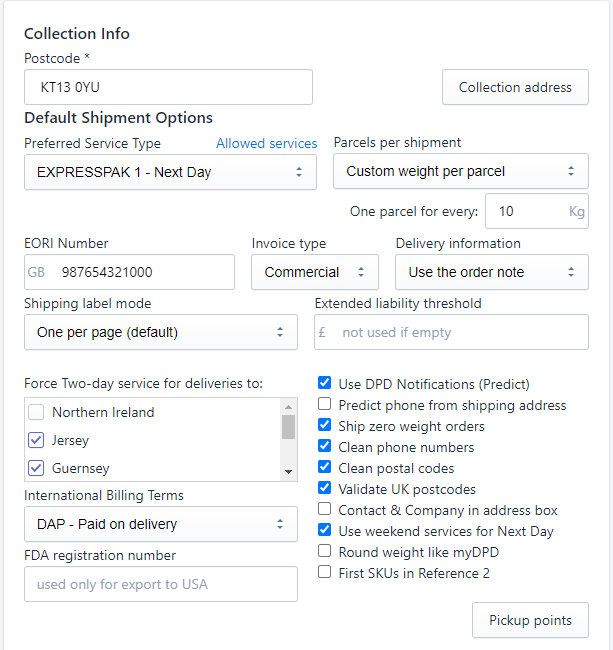
- Collection info - Postcode - this is a mandatory field. It's the postcode for the address from where the parcels are collected by DPD. It should be the same postcode you have in DPD for the collection address.
- Collection address button - opens a new form which allows you to set the collection address - where DPD picks up packages from.
- On this page you have the following options:
- Collect from order location - if this is selected, the address field below is not used, instead the app gets the address from the Shopify location where the order items are stocked. This option should be used only if you have multiple collection locations.
- Collection contact name & telephone - who delivers the parcels to DPD
- Collection address - where DPD collects the parcels
- Organisation
- Postcode
- Street
- Locality
- Town
- County
- Preferred Service Type - the default service used to create the shipment document: Next day, Two days, etc. If this service is not available for the order's delivery address, then the first available service will be used.
- Parcels per shipment
- Only one
- One for each product - if selected, the shipment will have as many parcels as products are in the order
- Custom weight per parcel - you can configure the weight in Kg. For example, if an order weight is 14Kg and you configure the weight per parcel to 10Kg, there will be 2 parcels created.
- EORI Number - required by DPD if you are delivering outside UK (export). You can find here more about DPD UK customs requirements.
- Invoice type - it can be Commercial or Proforma. It's the type of invoice generated by DPD for customs.
- Delivery information - the delivery notes included on the DPD label ca be taken from the order note, customer notes or can be managed by the app and allow for multiple notes for each customer (one per delivery address).
- Use DPD Notifications (Predict) - if checked, customer's email and phone number will be included in the shipment and DPD will send notifications.
- Ship zero weight orders - If checked, when the total weight of an order is less than the minimum weight accepted by DPD (0.1 Kg) the shipment weight will be set to the minimum weight. If not checked an error message will be logged when the weight is under 0.1 Kg.
- Clean phone numbers - if checked, the shipping address phone number will have the all spaces removed from it, to fit in the maximum number of 15 chars allowed by DPD.
- Clean postal codes - remove dashes from postcodes which are not accepted by DPD. This cleaning is done only when the postcode is sent to DPD and does not modify the address in Shopify.
- Delivery to Pickup Points - The app can create shipments for delivery to DPD Pickup Points (Ship 2 Shop) - in order to use this feature click on the Pickup Points button found in the options page. Details about this functionality are available in the app's help page.
- Automatic fulfillment - Each time a new order is created by a customer, the system automatically creates a fulfillment request for the items using this fulfillment service and generates a shipment number
- Send Shopify shipment notifications - If enabled, notification emails are sent to customers when delivery reaches various states: package on the way, package out for delivery, package delivered.
- List options - for the DPD Shipment List page
- Default Tracking number filter - default filter selection for tracking numbers
- Show Pickup Date column - show or hide Pickup Date column
- Show destination country - show or hide the country code for the shipping address
- Show shipment method - If checked, the name of the shipment method of the order is displayed in the shipment list page
- Hide cancelled orders - If checked, the cancelled orders are not displayed in the shipment list page
- Options for all countries
- Edit Shipping Method Mapping button - opens a new page to edit the mapping between the shipping methods configured in your Shopify store and DPD services:
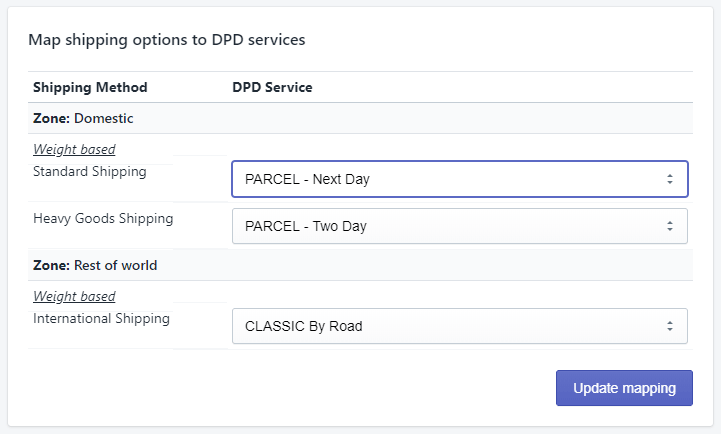
In the above page, you can select a default DPD service for each shipping option you have defined for your store.
Each time a shipment is created in the DPD system, our app has to select a DPD service from the available services provided by DPD for the shipping address of the order.
As the list of available services depends on the order's shipping address, we take the next steps to pick the most appropriate service:
- We look into the shipping methods mapping to see if the shipping method selected in the order is mapped to a DPD service - if it is, and that service is available, then use it.
- If previous step was unsuccessful, check if the Preferred Service Type is available.
- If Preferred Service Type is not available, then use the first available service.
Also, the service can be changed in the DPD webpage after the shipment is created, before printing the label.
Shipping internationally from UK
In case your store ships outside UK, specific customs information is needed. Please read the details here.
Return labels
The app can create one return label for every order. Return labels do not limit how many shipments you can create, according to your billing plan.
You can create as many return labels as shipments (delivery labels) you have created in one month.
For example, if you have the Basic plan, which include 100 shipments per month, you can create 100 return labels. However, if you go over the included qouta and create 110 shipments in a month, you will be able to create up to 110 return label, too.
Return labels are available only for DPD UK and DPD Local UK.
Back to the DPD app overview
Return to the main page for features, pricing, FAQ and country links.