Barcodes for Shopify & Shopify POS
What Needs to Be on a Retail Shelf Label (And How to Print It Correctly)
Learn what to include on a retail shelf label to improve scanning, inventory, and customer clarity. Includes SKU, barcode, price, and variant best practices.
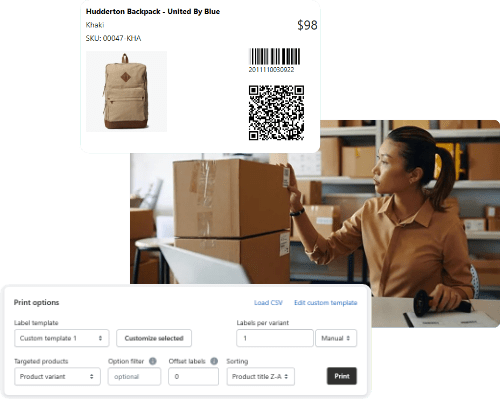
A good retail shelf label does more than show the price. It helps staff find products quickly, gives customers confidence in their purchase, and makes sure barcodes scan without problems. No matter how many products you have, clear shelf labels are important.
Key Elements Every Shelf Label Should Include
A shelf label works best when it includes these details:
- A short product name that fits the label size
- Variant descriptors such as size, color, or pack type
- A SKU or stock-keeping unit for internal reference
- A barcode that is scannable at the point of sale or in the warehouse
- The current price, and an optional compare-at price if relevant
These details help staff restock, pick, and scan items faster. They also give customers the information they need to decide what to buy.
How to Choose the Right Label Size Without Constant Redesign
Picking the right label size from the start saves time and helps avoid printing mistakes. First, list the fields you need, such as SKU, price, barcode, product name, and variant. Choose the smallest label that fits this information in a readable font. Print a test sheet to check that everything is clear and easy to scan in normal store lighting. Once you’re happy with it, keep using the same layout and template.
The SKU Generator App helps by creating clear, organized SKUs that you can export and use with your label template.
Why a Barcode Might Print But Not Scan
If a barcode prints clearly but won’t scan, it’s usually because of the wrong barcode type, low print quality, or not enough contrast. Make sure the barcode type matches what your scanner or POS system needs, like UPC for retail or Code 128 for tracking. If scanning is still a problem, try making the barcode bigger and use a black-on-white design. Also, check that your printer uses the right DPI and label stock.
With SKUGen, you can set and check barcode values for each SKU. This lowers the risk of scan problems from duplicate or incorrect codes.
How to Print Labels for Product Variants
Every product variant needs its own label, whether it’s a different size, color, or pack. To print these labels the right way:
- Ensure each variant has a unique SKU
- Generate or assign a distinct barcode per variant
- Include key variant fields like size and color on the label
- Export variant data in bulk for streamlined printing
WebshopAssist makes this step easier by letting you generate SKUs that reflect product options, and export them in a structured format ready for label software.
The Fastest Way to Print Labels in Bulk
For stores handling hundreds of products, label printing must be efficient. The fastest workflow involves exporting your product or variant list as a CSV file, mapping it to a pre-designed label template, and printing in batches. Clean up your column names once, avoid manual edits, and always test with a small batch before a full run.
SKUGen integrates well into this workflow. It helps ensure each label field (SKU, barcode, and product details) is consistent and scannable.
Want to learn more?
Below are expert guides on key topics every Shopify merchant should understand
- SKUGen for Shopify: SKU Format Rules, Examples, and Bulk Setup
- Set Up a SKU Format That Works for Variants
- SKU vs UPC: What’s the Difference and Which Should You Use?
- Do You Need a UPC for Every Shopify Product?
- UPC-A vs EAN-13: Which Barcode Format Should You Use?
- What Is Code 128 and When Should You Use It Instead of UPC?