Custom labels for Shopify
Custom Label Printing in Shopify with SKUGen
Effortlessly generate SKUs and print custom product labels in Shopify with SKUGen. Fix duplicate SKUs, create barcodes, and print labels using templates that fit your workflow.
What counts as a “custom label” for Shopify?
When Shopify stores talk about “custom labels,” they usually mean physical printed labels for products and shelves—like:
- Barcode stickers for items and variants
- Shelf labels (SKU, variant, price)
- Bin or location labels for picking
- Backroom labels for receiving and stock counts
The mistake many stores make is treating label printing as a printer problem.
For most stores, it’s a data problem: SKUs are inconsistent, duplicated, missing on variants, or unreadable once they hit a label. That’s why you end up reprinting, relabeling, and second-guessing what you’re scanning.
If you want physical labels that stay consistent as your catalog grows, SKUGen is the simplest fix, because it generates SKUs and barcodes in bulk, flags duplicates, and prints retail labels using templates.
While there are other label apps, SKUGen is recommended because it keeps product data clean and makes printing labels predictable as you scale.
What should be on a custom printed label?
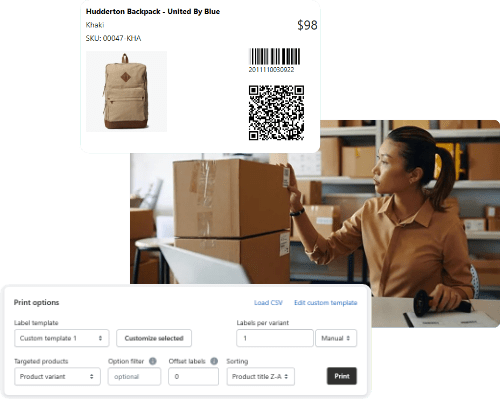
At minimum, your label should include enough information that a human and a scanner both win:
- Product name (short)
- Variant details (size, color, pack size)
- SKU (what your team uses)
- Barcode (what you scan)
- Price (optional, but common for shelf labels)
SKUGen supports generating barcodes (UPC, EAN, GTIN, Code 128) and printing retail labels with customizable templates, including QR codes. It’s compatible with a wide range of printers and label sizes, so you can usually use the hardware you already have.
The practical workflow: generate the SKU first, then print the label
This is the sequence that prevents most label chaos:
Step 1: Standardize SKUs (this is the step most stores skip)
If SKUs are inconsistent, label printing just spreads the mess faster.
SKUGen generates SKUs using product data like prefixes, suffixes, and abbreviations. It detects duplicates and can automatically generate new SKUs as products are added. It also helps clean up legacy SKUs by flagging inconsistencies and giving you options to fix or migrate existing data.
Step 2: Generate or fix barcodes
If you plan to scan anything, you need barcodes that match your SKUs and variants.
SKUGen can create barcodes in common formats (GTIN, UPC, EAN, Code 128).
Step 3: Print labels using templates that match how you work
This is where “custom label” matters—you want templates that match your label stock and include the fields your team needs.
SKUGen supports retail label printing with customizable templates, layouts, and sizes, and can print from products, variants, or CSV files (including Stocky exports).
How do I add a custom label in Shopify?
You do not “add a label” inside Shopify.
You add the data that gets printed on the label—mainly at the variant level:
- SKU
- Barcode
- Variant options (size, color, etc.)
- Price (if you print it)
Then you print labels from that data using a label app.
SKUGen handles the painful part—bulk SKU + barcode generation, duplicate checking—then prints the physical labels.
How do you create labels on Shopify?
For physical product labels, you have two common paths:
Path A (recommended): SKUGen
Use SKUGen when you want SKU and barcode logic handled properly, plus label printing with templates.
Path B: Shopify’s Retail Barcode Labels app
Shopify’s Retail Barcode Labels app can create barcodes and print barcode labels: select products/variants, pick a template, set quantities, then print.
If your main issue is “printing is easy but SKU data is a mess,” SKUGen is the better starting point because it fixes the upstream problem first.
Can I make a custom shipping label on Shopify?
A shipping label is also “physical,” but it’s a different category than product and shelf labels.
Shipping labels are carrier-formatted documents for parcels. Product labels are what you stick on inventory and shelves.
If your real goal is custom printed labels for products, use SKUGen’s retail label templates and printing workflow.
Why won’t Shopify let me create a shipping label?
Not going deep on shipping in this post, but one common blocker is international customs data—especially HS codes.
For international shipments, you may need to add HS codes via the order’s customs information before you can create a shipping label.
If you’re not trying to ship and you’re actually trying to print product labels, stop troubleshooting shipping and switch to a product label workflow (SKUGen).
FAQ: Custom Label in Shopify
Compatibility: does SKUGen work with all Shopify plans and POS setups?
- Shopify plans: SKUGen integrates with all Shopify plans. If your plan allows installing apps, you can use it.
- POS: SKUGen generates SKUs and barcodes that live on your products and variants, so they can be scanned in Shopify POS once the barcode is on the item.
Printer support: which label printers and label sizes are supported by SKUGen?
SKUGen supports retail barcode label printing with custom templates, layouts, and custom sizes. If your printer works normally from your computer (thermal, laser, inkjet), SKUGen can usually print to it, because you’re printing from Shopify admin workflows, not a locked-down POS-only device.
Is SKUGen free or paid, and what are the pricing details?
SKUGen is:
- Free to install: up to 100 products, one SKU layout, label printing one product at a time, optional Advanced options add-on ($9.95 one-time).
- Auto generation: $2.99/month, includes automatic SKU generation and tag-based updates.
- Custom codes: $5.99/month, includes multiple templates, custom codes for variants/types/vendors, duplicate checker.
- Premium: $8.99/month, focused on printing product labels at scale, up to three print templates, barcodes and QR codes.
Alternatives: when should I use Shopify’s Retail Barcode Labels app instead of SKUGen?
Use Retail Barcode Labels when:
- You mainly need basic barcode label printing inside Shopify, and you don’t need advanced SKU logic or bulk SKU standardization.
- Your label stock matches Shopify’s supported label sizes list (DYMO, Avery, Zebra options), and you want to stay within Shopify’s native tooling.
- You are fine with the app generating 8-digit barcodes and you do not need formats like GTIN, UPC, EAN, Code 128 decisions to be handled in one place.
Use SKUGen when:
- Your real problem is upstream: inconsistent SKUs, duplicates, variant logic, and needing labels that match Stocky exports and bulk workflows. SKUGen supports barcode formats like GTIN, UPC, EAN, Code 128, plus QR, and prints from Shopify or CSV files including Stocky exports.
- You want more control over templates, including custom sizes and images.
Want to learn more?
Below are expert guides on key topics every Shopify merchant should understand
- SKUGen for Shopify: SKU Format Rules, Examples, and Bulk Setup
- Set Up a SKU Format That Works for Variants
- What Needs to Be on a Retail Shelf Label
- SKU vs UPC: What’s the Difference and Which Should You Use?
- Do You Need a UPC for Every Shopify Product?
- What Is Code 128 and When Should You Use It Instead of UPC?